 ArcView Tutorial 4: The Instream Flow Reservation Process ArcView Tutorial 4: The Instream Flow Reservation Process
Master Folder
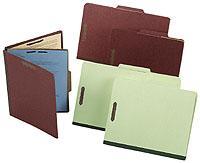 You will make a master folder for the reservations containing copies of
everything you produce. The brown top-bound multi-section folders are
pictured at right. This folder is intended to keep clean copies for
reproduction rather than working copies. The tentative order for
information is:
You will make a master folder for the reservations containing copies of
everything you produce. The brown top-bound multi-section folders are
pictured at right. This folder is intended to keep clean copies for
reproduction rather than working copies. The tentative order for
information is:
Section 1: Info sheet, copy of gage records from XXX
Section 2: Reservation
Section 3: Reach & area maps
Section 4: Tennant tables and charts
Section 5: Copies of the hydrograph
Section 6: SAS data documents (after word conversion)
Section 7: Periodicity tables
Section 8: Misc.
Continue with Tutorial
Previous item in Tutorial
Return to ArcView Tutorial 4: List of Topics
Return to Main Menu